


Free vs Paid SSL Certificate: Which One Do You Need?
Latest Posts
Understanding SSL Certificates
SSL certificates secure data exchanged between a visitor’s browser and a web server. In practice, modern website SSL relies on TLS, or Transport Layer Security, even though “SSL” remains the common name. When installed correctly, an HTTPS certificate enables encrypted connections, confirms domain ownership through a Certificate Authority (CA), and helps prevent eavesdropping, tampering, and certain man-in-the-middle attacks.
This matters far beyond encryption alone. A valid certificate supports HTTPS, improves user trust, protects login forms, checkout pages, APIs, and control panels, and contributes to stronger site integrity for search engines. Related technologies such as HSTS, OCSP Stapling, SNI, Certificate Transparency, RSA, and ECC all shape how secure, fast, and compatible a certificate deployment will be. If your website runs on cloud infrastructure or a virtual server, pairing SSL with a properly configured hosting environment is just as important as choosing the certificate itself.
An SSL certificate enables HTTPS by encrypting traffic and validating identity. It protects data in transit, supports browser trust, and is a foundational layer of website security and SEO.
What is an SSL Certificate?
An SSL certificate is a digital file issued by a trusted CA that binds a public key to a domain name or organization. The certificate contains key details such as the domain, validation level, validity period, issuing authority, public key information, and cryptographic signature. During the TLS handshake, the server presents this certificate so the browser can verify authenticity before setting up an encrypted session.
Certificates also vary by purpose and scope. A standard single-domain certificate covers one hostname, a wildcard certificate covers subdomains, and a multi-domain or SAN certificate can protect several domains within one deployment. Technical attributes such as encryption algorithm, key length, browser compatibility, automation support, and renewal frequency all affect real-world management and security outcomes.
The Importance of SSL Certificates in Website Security
Without HTTPS, sensitive traffic such as passwords, account sessions, contact form submissions, and payment details may be exposed to interception. SSL and TLS help preserve confidentiality, integrity, and authenticity, which are core security principles for any public-facing site. This is especially important for eCommerce stores, SaaS dashboards, webmail, customer portals, and admin panels.
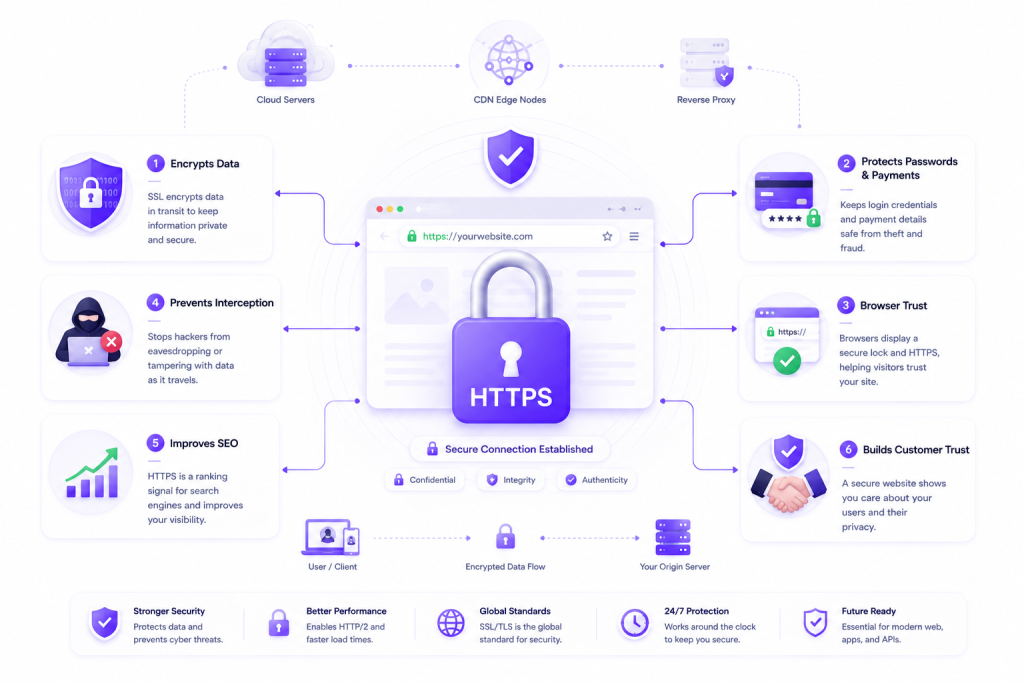
SSL certificates also influence trust signals. Browsers mark non-HTTPS pages as “Not Secure,” while a valid certificate supports a cleaner user experience and a more credible brand presence. For businesses, that trust can affect conversions, form completions, and lead quality. For technical teams, proper SSL management also intersects with reverse proxies, load balancers, CDN edge nodes, and web servers like Nginx or Apache running on cloud and server infrastructure.
Free vs Paid SSL Certificate: The Basics
The core debate in free vs paid SSL certificate decisions is not whether one encrypts traffic and the other does not. Both free SSL and paid SSL can provide strong TLS encryption when configured correctly. The real difference between free and paid SSL usually comes down to validation type, warranty amount, support, automation, certificate options, brand assurance, and operational convenience.
For many websites, free certificates are perfectly sufficient. For others, a commercial SSL certificate offers features that align better with compliance, customer trust, internal governance, or multi-domain infrastructure. This is why free ssl vs paid ssl should be evaluated as a use-case decision rather than a simple price comparison.
Free and paid SSL certificates can both secure traffic with HTTPS. Paid certificates usually add business-oriented features such as OV or EV validation, vendor support, broader certificate options, and warranty-backed issuance.
Defining Free SSL vs Paid SSL
Free SSL certificates are usually Domain Validation (DV) certificates issued at no cost by providers such as Let’s Encrypt. They verify control of the domain, support automation through ACME clients, and are widely used for blogs, development platforms, APIs, and personal websites. Their short validity period often encourages frequent automated renewal, which is efficient when server administration is well handled.
Paid SSL certificates can include DV, Organization Validation (OV), or Extended Validation (EV) levels. A premium SSL certificate may also offer wildcard coverage, multi-domain support, managed issuance, malware scanning bundles, priority support, stronger administrative tooling, and higher warranty amounts. These additions do not make encryption “more encrypted,” but they may improve operational trust, business verification, and procurement suitability.
Key Differences Between Free and Paid SSL Certificates
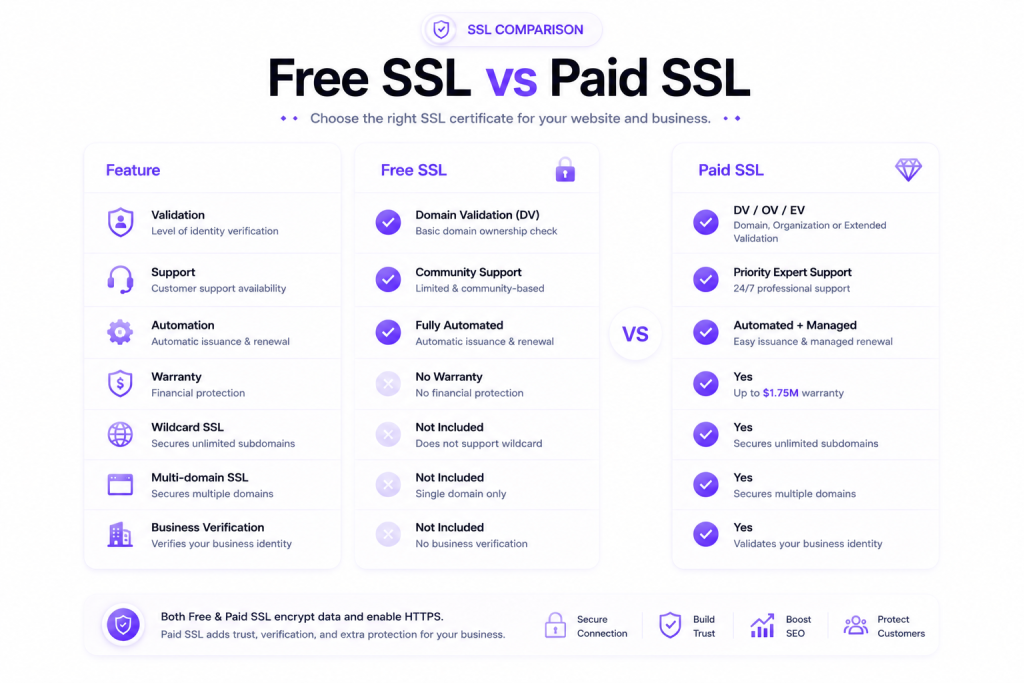
The most important distinction is validation. Free options are typically DV only, while paid providers can also issue OV and EV certificates, which involve additional checks on the organization’s legal identity. For some industries, that extra identity validation matters for procurement reviews, compliance frameworks, vendor assessments, and customer confidence.
- Validation level: Free is usually DV; paid can be DV, OV, or EV.
- Support: Free certificates often rely on documentation and community help; paid vendors usually provide direct support.
- Automation support: Free providers like Let’s Encrypt are strong for automated renewal; some paid platforms also support automation but vary by vendor.
- Certificate types: Paid plans more commonly offer wildcard, SAN, and enterprise deployment features.
- Warranty amount: Commercial certificates often include warranty coverage tied to issuance assurance.
- Trust indicators: OV and EV provide stronger business identity verification, though browser UI indicators are less prominent than in the past.
- Renewal frequency: Free certificates often renew every 90 days; paid certificates may have different lifecycle and management workflows.
SSL Certificate Comparison
An effective ssl certificate comparison should focus on what actually changes security and operations: TLS configuration, certificate lifecycle management, CA reputation, key type, automation, compatibility, and validation depth. The certificate is only one part of a secure deployment. Weak ciphers, outdated protocols, misconfigured redirects, missing HSTS, or poor private key storage can undermine even the best ssl certificate choice.
That is why security teams compare both certificate features and implementation details. Whether you run a small site on shared infrastructure or a larger app behind load balancers, WAF rules, and CDN endpoints, the right certificate should match your architecture. Platforms hosted on scalable environments such as server and cloud services often benefit from automation-friendly SSL management to reduce outage risk.
The best SSL certificate is the one that matches your validation needs, deployment model, renewal process, and support expectations. Security depends as much on TLS setup and key management as on certificate price.
SSL Certificate Security Comparison: Free vs Paid
From a pure encryption standpoint, free and paid certificates can offer equivalent protection when both use modern TLS, secure key exchange, and strong cipher suites. A DV certificate from Let’s Encrypt can secure traffic with the same fundamental cryptographic standards as a paid DV certificate. The difference is usually not encryption strength, but validation, support, issuance workflow, and vendor service level.
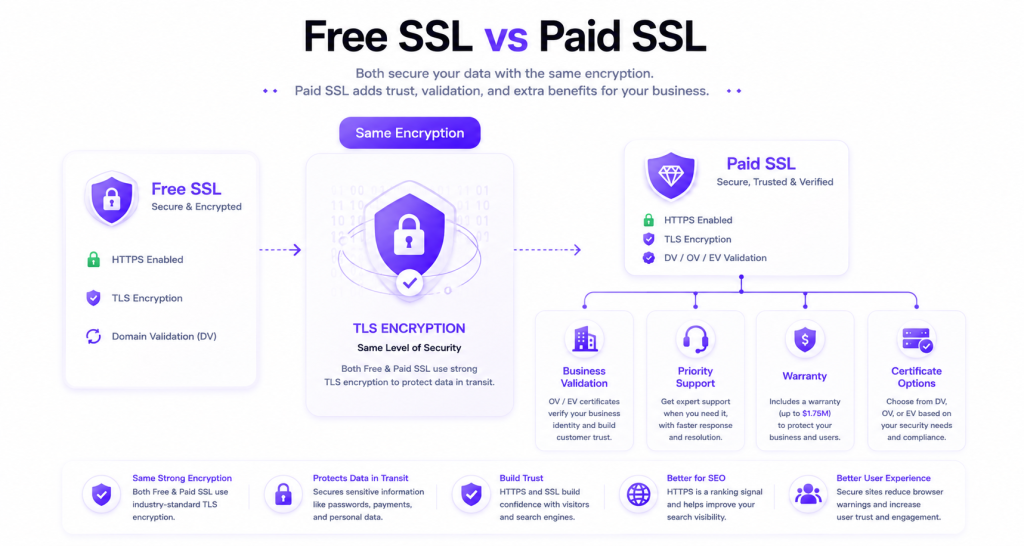
Security comparisons should also include operational factors. Automated renewal reduces the risk of expired certificates, while managed support can help teams troubleshoot chain issues, browser trust warnings, OCSP behavior, SNI deployment, or legacy device compatibility. Certificate Transparency logs, proper private key rotation, RSA versus ECC choices, and secure storage on the origin server all matter in practice.
| Feature | Free SSL | Paid SSL |
|---|---|---|
| Encryption standard | Strong TLS encryption | Strong TLS encryption |
| Validation level | Usually DV | DV, OV, or EV |
| Automation | Excellent with ACME | Varies by provider |
| Support | Limited or self-service | Usually direct vendor support |
| Wildcard / SAN options | May be limited by provider | Commonly available |
| Warranty amount | Typically none | Often included |
| Best use case | Blogs, personal sites, dev stacks | Businesses, stores, multi-domain environments |
Lets Encrypt vs Paid SSL: Examining Popular Options
Let’s Encrypt vs paid SSL is one of the most common buying questions because Let’s Encrypt has made HTTPS widely accessible. It is one of the best free ssl certificate providers for standard websites, especially where automation is possible through tools such as Certbot, control panels, Kubernetes ingress controllers, or hosting integrations. For a personal blog, portfolio, staging site, or API endpoint, it is often the most practical choice.
Paid SSL becomes more attractive when organizations need OV or EV, custom support, procurement-friendly billing, or advanced certificate combinations such as wildcard plus SAN coverage. Businesses with multiple subdomains, mixed environments, or customer-facing compliance expectations may prefer a commercial SSL certificate for administrative consistency. In short, Let’s Encrypt vs paid ssl is mostly a question of business requirements, not encryption quality.
Cost Benefit Analysis of SSL Certificates
A useful ssl cost benefit analysis weighs direct certificate cost against business impact, administrative time, support needs, and risk tolerance. Free SSL removes licensing cost, which is ideal for budget-sensitive projects. But if downtime from an expired certificate could interrupt sales, damage reputation, or trigger urgent support work, a paid solution with managed services may justify its price.
This is especially relevant for teams running production workloads with multiple environments, customer portals, or public APIs. The cheapest certificate is not always the lowest-cost option over time. You also need to consider labor, renewal monitoring, validation workflows, certificate inventory, and whether your platform can automate deployment cleanly across web servers, proxies, and containerized applications.
Paid SSL is worth the cost when it reduces operational risk, supports business validation, or simplifies certificate management across revenue-generating systems. Free SSL is often the best value for simple websites with reliable automation.
SSL Cost Benefit Analysis: Weighing Your Options
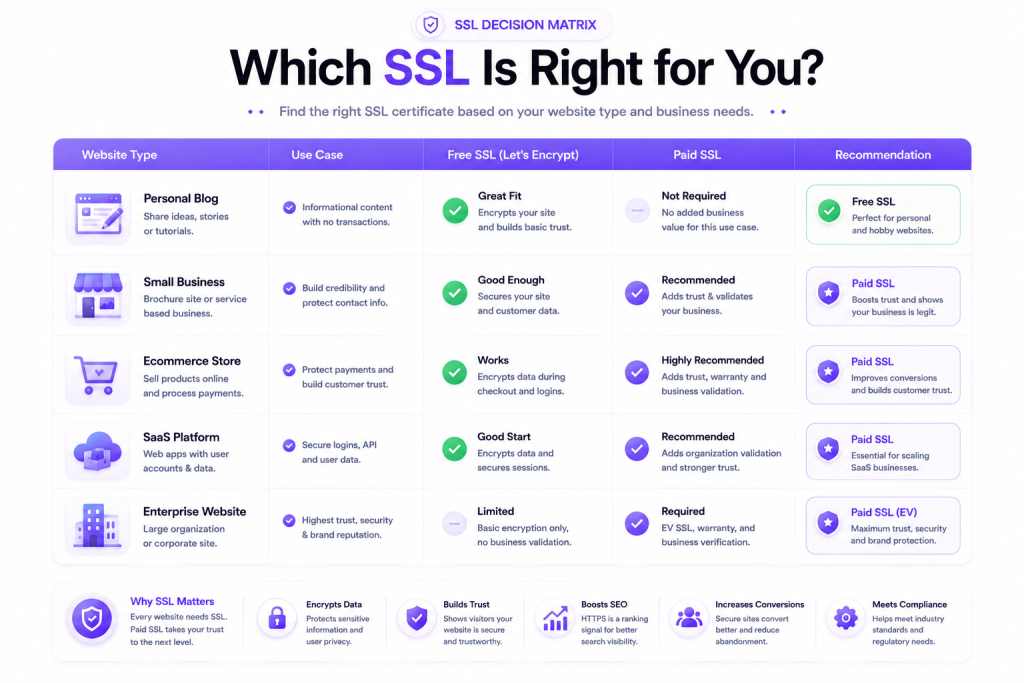
For a free ssl certificate for personal website use, the value proposition is hard to beat. If the site contains informational content, a contact form, and no major trust-sensitive transactions, free DV SSL is usually enough. The key requirement is to keep renewal automated and monitor certificate expiration to avoid browser errors.
For a business website, ssl certificate cost comparison should include non-price variables. These include support response time, company identity validation, integration with load balancers, multi-domain requirements, issuance speed, warranty amount, and vendor tooling. An online store or lead-generation site may benefit more from managed certainty than from saving a relatively small annual certificate fee.
- Choose free SSL when: the site is personal, low-risk, simple to automate, and uses standard DV coverage.
- Choose paid SSL when: you need OV or EV, vendor support, broader certificate formats, or easier governance for production systems.
- Review hidden costs: staff time, failed renewals, outage impact, and manual deployment complexity.
Is a Premium SSL Certificate Worth the Investment?
A premium SSL certificate is worth considering when identity assurance matters as much as encryption. This applies to eCommerce, finance, healthcare-adjacent services, enterprise B2B platforms, and regulated organizations that need documented ownership verification. In these cases, a paid certificate can align better with customer expectations, vendor due diligence, and internal security policies.
That said, paid does not automatically mean better security. A poorly configured premium certificate on a weak server setup is still a problem. The real value comes from combining the right validation level with strong TLS settings, timely renewal, secure key handling, HSTS, and a well-maintained application stack. Teams deploying on managed environments or scalable infrastructure from providers like Cloudoora often benefit most when certificate management is treated as part of a broader security baseline.
Choosing the Right SSL Certificate for Your Needs
Choosing the right ssl certificate starts with a simple question: what level of trust, verification, and operational support does your website actually need? A hobby blog, SaaS dashboard, online store, and corporate website may all use HTTPS, but they do not have the same audience expectations or infrastructure requirements. That is why one certificate type does not fit every project.
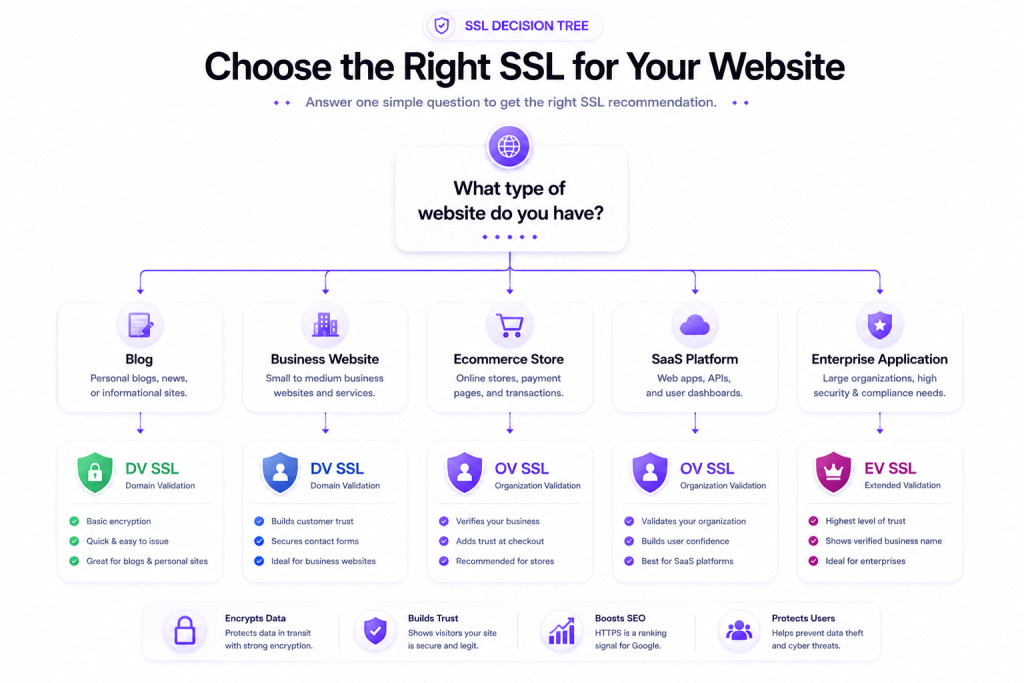
A good buying decision should account for domain structure, renewal workflow, control panel support, web server compatibility, customer sensitivity, and future growth. This prevents common mistakes such as buying an OV certificate for a simple landing page or relying on manual free SSL renewal for a critical production service.
Choose free DV SSL for simple websites that can automate renewals. Choose paid DV, OV, or EV when you need more certificate types, formal business validation, or vendor-backed support for production use.
Factors to Consider When Selecting an SSL Certificate
Think in terms of technical fit and business context. Certificate selection affects not only HTTPS but also maintainability across Nginx, Apache, cPanel, Plesk, reverse proxies, containers, and CDN edge configurations. It also affects how easily your team can rotate keys, renew certificates, and troubleshoot browser compatibility issues.
- Validation level: DV for basic encryption, OV for business verification, EV for the highest validation depth.
- Certificate scope: single domain, wildcard, or SAN/multi-domain.
- Key type: RSA for broad compatibility, ECC for efficiency and performance benefits on supported clients.
- Validity period: shorter lifecycles improve discipline but increase renewal frequency.
- Automation support: critical for large fleets, cloud deployments, and containerized applications.
- Browser compatibility: important for older devices, embedded systems, and international audiences.
- Support model: self-managed documentation versus direct vendor assistance.
- Trust indicators: useful for customer-facing businesses that want visible assurance beyond basic HTTPS.
SSL Certificate for Small Business vs Personal Websites
A free ssl certificate for personal website projects is usually enough if the goal is secure browsing, form encryption, and modern browser compliance. Personal blogs, portfolios, developer projects, and nonprofit informational sites commonly use Let’s Encrypt successfully. The main requirement is to ensure automatic renewal and correct server configuration.
An ssl certificate for small business use often deserves a more structured decision. If the site handles customer accounts, quote requests, contracts, or payments, paid SSL may provide better administrative support and stronger identity verification. Small businesses also tend to benefit from easier renewal oversight, broader certificate choices, and cleaner integration with hosting panels, VPS instances, or dedicated environments. If you run business applications on scalable infrastructure, pairing the certificate with reliable VPS or cloud hosting helps maintain both trust and uptime.
Conclusion
The difference between free and paid ssl is not about whether HTTPS works. Both free and paid certificates can encrypt traffic effectively when deployed with modern TLS, secure private key handling, HSTS, and proper server configuration. The bigger differences are validation level, support, automation flexibility, certificate scope, and how much operational assurance your website needs.
For personal websites, blogs, development environments, and many standard business sites, free SSL can be the right and most efficient choice. For organizations that need OV or EV validation, multi-domain coverage, warranty-backed issuance, or direct support, a paid or premium SSL certificate often makes more sense. The best approach is to match the certificate to the website’s risk profile, trust requirements, and infrastructure model rather than assuming that higher price always means stronger security.
Frequently Asked Questions
What is the difference between free and paid SSL certificates?
The main difference is usually validation and service level, not encryption strength. Free certificates are typically DV only and work well for basic HTTPS. Paid certificates may offer DV, OV, or EV, along with support, warranty coverage, wildcard or SAN options, and business-friendly management features.
Are paid SSL certificates worth the cost?
They can be worth the cost if your website generates revenue, handles sensitive customer interactions, or requires business identity verification. Paid SSL is also useful when support, simplified administration, or advanced certificate options reduce operational risk. For simple websites with reliable automation, free SSL is often enough.
Do free SSL certificates offer the same level of security as paid ones?
In terms of transport encryption, they can. A free DV certificate can use strong TLS and protect data in transit just like a paid DV certificate. However, paid certificates may provide higher validation levels, vendor support, and broader deployment features that improve trust and manageability.
How do I choose between a free and a paid SSL certificate?
Start with your use case. Choose free SSL if you need standard HTTPS for a blog, personal site, or simple application and can automate renewals. Choose paid SSL if you need OV or EV validation, wildcard or multi-domain support, direct support, or a more structured certificate program for business operations.
What are the benefits of a paid SSL certificate over a free one?
The main benefits are access to OV or EV validation, broader certificate types, customer support, warranty coverage, and easier alignment with procurement or compliance requirements. These benefits matter most for businesses, eCommerce, enterprise platforms, and websites where trust and continuity are commercially important.
Which is better: Let’s Encrypt vs paid SSL?
Let’s Encrypt is better for many standard websites because it is free, trusted, and easy to automate. Paid SSL is better when the website needs formal organization validation, vendor support, or more specialized certificate options. The better choice depends on business requirements rather than raw encryption capability.
How do I install an SSL certificate?
The process depends on your server stack. In general, you generate or request the certificate, validate domain ownership, install the certificate and private key on the web server or control panel, enable HTTPS, redirect HTTP to HTTPS, and test the configuration. Many hosting platforms automate these steps for free DV certificates, while paid certificates may involve manual or managed installation workflows.

About Manzurul Haque
Read more articles by Manzurul Haque and stay updated with the latest insights.
View all posts by Manzurul HaqueStay Updated
Get the latest articles and insights delivered to your inbox.